Sale!

Relativity Mass Downloader – Fast Bulk File Export Tool

Original price was: $90.00.Current price is: $45.00. / month for 24 months with a 7-day free trial

Product Overview

Streamline your legal review and eDiscovery workflows using the Relativity Mass Downloader, a secure and efficient utility for bulk downloading native documents from the Relativity platform. Whether you’re dealing with internal investigations or litigation at scale, this tool ensures fast, reliable access to critical case files through a user-friendly interface.

🔧 How to Use Relativity Mass Downloader

1

🔐 Connect Securely to Relativity

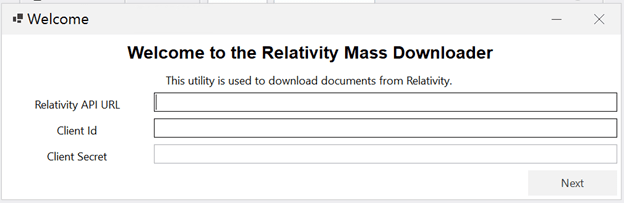
Start by entering your Relativity API URL, along with the OAuth Client ID and Client Secret credentials. This ensures secure, direct access to your Relativity instance with token-based authentication.

Relativity Mass Downloader Interface

Relativity Mass Downloader Interface

Required Credentials:

  • Relativity API URL: Your Relativity instance API endpoint
  • OAuth Client ID: OAuth application client identifier
  • Client Secret: Secure OAuth authentication secret
🔒 Security Note

OAuth token-based authentication ensures secure access to your Relativity instance without exposing passwords. All credentials are encrypted during transmission.

2

📁 Choose Workspace and Upload Artifact IDs

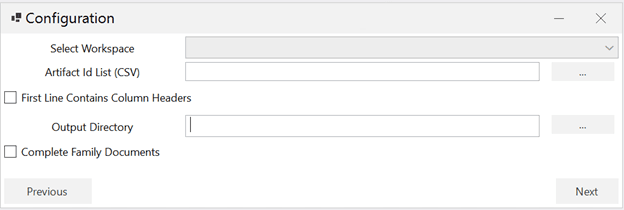
Select your desired Relativity workspace, then upload a CSV file containing the Artifact IDs of documents to download. If your file includes headers, just check the box to handle them appropriately.

CSV File Requirements:

  • Single column containing Artifact IDs (numeric identifiers)
  • Optional header row (can be automatically skipped)
  • One Artifact ID per line
  • Standard CSV format (.csv extension)
Sample CSV Format

ArtifactID
1001234
1001235
1001236
1001237

3

⚙️ Configure Download Settings

Set a destination folder on your local system. Enable Complete Family Documents if you want to include all related files sharing the same group identifier, helping preserve context in document productions.

Relativity Mass Downloader Configuration

Download Configuration Settings

📂 Destination Folder
Specify where downloaded native files will be saved on your local system
👨‍👩‍👧‍👦 Complete Family Documents (Optional)
Download all documents in the same family group to maintain parent-child relationships and email thread integrity

💡 Pro Tip

Enable “Complete Family Documents” when downloading emails to automatically include attachments and related documents, ensuring complete productions.

4

⏱️ Track Download Progress in Real Time

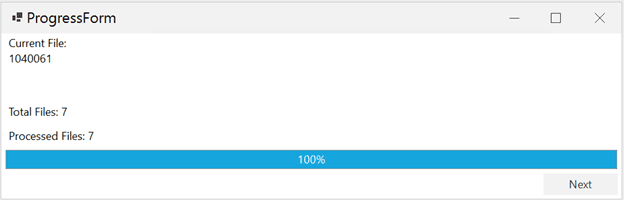
Watch progress live through our real-time tracker. Once complete, a detailed report will summarize the success or failure of each file download for easy auditing.

Relativity Mass Downloader Progress Tracking

Real-Time Progress Tracking

✓ Live Progress Updates
See current download status, completed files, and remaining items in real-time
📊 Detailed Completion Report
Comprehensive summary showing successful downloads, failures, and error messages for troubleshooting
⚠️ Error Tracking
Identifies which documents failed to download and provides specific error details for resolution

✅ Why Use Relativity Mass Native Downloader?

Secure OAuth Integration: Token-based authentication ensures safe, direct access to Relativity

Bulk Download Speed: Fast, efficient downloading of native documents at scale

Family Grouping: Optional complete-family download maintains document relationships

Simple CSV Import: Easy Artifact ID import from standard CSV files

Real-Time Monitoring: Live progress tracking and detailed completion reporting

Audit Trail: Complete download history with success/failure status for each document

💼 Common Use Cases

📑

Legal Productions

Download native files for productions to opposing counsel, ensuring complete document families are included.

🔍

Internal Investigations

Bulk download relevant documents for detailed offline analysis or secondary review platforms.

💾

Data Preservation

Create local backups of critical case documents for archival or long-term storage requirements.

📤

Client Deliverables

Prepare native file packages for client review or delivery outside the Relativity platform.

🔗 Our Other Products

Enhance your eDiscovery workflow with these complementary tools:


📑 Opticon to Searchable PDF

Convert Opticon image sets to searchable PDF documents for productions

📊 RSMF Metadata Extractor

Extract structured metadata from RSMF chat communication files

📋 DAT Manipulator

Preview, validate, and split DAT and OPT files with precision

🔗 Helpful Resources

🎯 Perfect for Large-Scale Document Downloads

The Relativity Mass Native Downloader streamlines the process of bulk downloading native documents from Relativity, whether you’re preparing productions, conducting investigations, or creating archival backups. With secure OAuth authentication, family grouping options, and real-time progress tracking, this tool gives legal teams the efficiency and reliability they need for high-volume document management tasks.

💻 System Requirements
  • Windows operating system (Windows 10 or later recommended)
  • Active Relativity instance with API access
  • OAuth Client ID and Client Secret credentials
  • Network access to Relativity API endpoint
  • Sufficient local disk space for downloaded files
  • CSV file with Artifact IDs for bulk downloads
Reviews

There are no reviews yet.

Be the first to review “Relativity Mass Downloader – Fast Bulk File Export Tool”

Your email address will not be published. Required fields are marked *

Shopping Cart
  • Your cart is empty.