Sale!

Opticon to searchable text

Original price was: $180.00.Current price is: $90.00. / month for 24 months with a 7-day free trial

Category:

Product Overview

Easily convert Opticon image files to searchable text with our efficient and secure conversion tool. Designed for legal professionals and document specialists, this solution streamlines your document review process by extracting readable text from images referenced in .OPT files. Say goodbye to manual data entry and enjoy fast, accurate text generation.

๐Ÿ”ง Configuration Steps

1

๐Ÿ” Input File

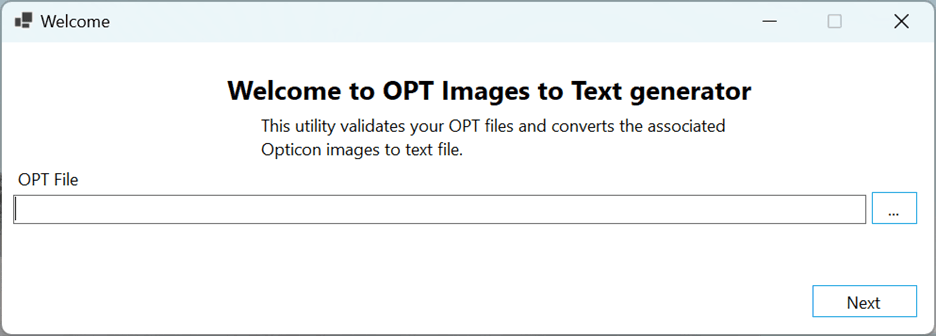
Provide the full path to your Opticon file (.OPT) that contains references to image documents. The tool will use this file to locate and process each image for text extraction.

Input File Selection

2

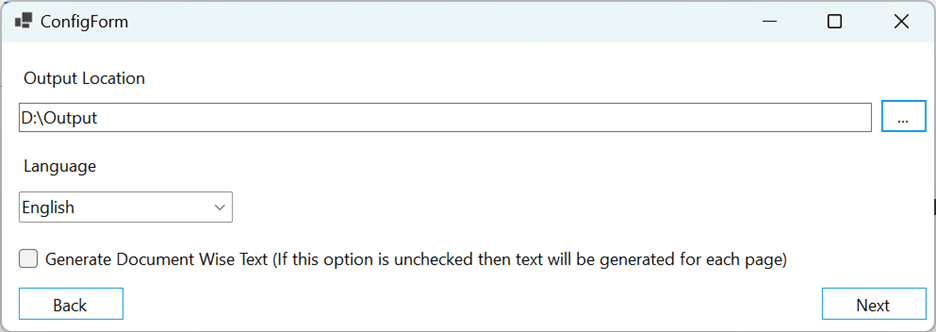
๐Ÿ“ Output Location

Choose a directory where the extracted text files will be saved.

โš ๏ธ Important

All existing files and folders in the selected output location will be permanently deleted before the process begins. Please double-check your folder selection to avoid data loss.
Output Location Selection

3

๐ŸŒ Language Selection

Select the language for OCR-based text extraction. This helps ensure higher accuracy during the conversion process, especially for multilingual documents.

4

๐Ÿงพ Optional: Document-wise Text Generation

Enable this feature if you’d like the tool to:

๐Ÿ“„ Separate Files
Create a separate text file for each image
๐Ÿ”ข Bates Number Naming
Name each file using the Bates number from the Opticon file
๐Ÿ”— Auto-Merge
Automatically merge these files into one final document after generation
๐Ÿ’ก Tip

This option is helpful if you want structured, per-document output before combining it into a searchable archive.

5

โœ… Output Review

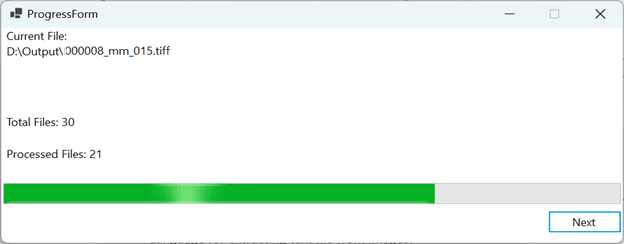
Once the process is complete, navigate to your specified output folder to review the generated text files. Each file will be ready for full-text search, review, and analysis.

Output Review

๐Ÿ’ก Why Use Our Opticon to Searchable Text Tool?

โœ“

Quick Conversion: Converts scanned legal images to plain text quickly

โœ“

Language Support: Supports language-specific OCR for accurate results

โœ“

Structured Output: Maintains document structure using Bates numbers

โœ“

Time Savings: Saves time on manual transcription and review

๐Ÿ”— Helpful Resources


๐Ÿ“„

What is an Opticon file?
Learn about Opticon file formats and structure


๐Ÿ“š

Opticon files and legal load formats
EDRM resources on legal document standards


๐Ÿ”ฝ

Relativity Mass Native Downloader
Explore our bulk document download tool


๐Ÿ“‘

Opticon to Searchable PDF
Convert Opticon files to searchable PDF format


๐Ÿ’ป System Requirements
  • Windows operating system (Windows 10 or later recommended)
  • Read access to .OPT files and associated image files
  • Write access for output text directory
  • Sufficient disk space for extracted text files
  • OCR engine with multilingual support
Reviews

There are no reviews yet.

Be the first to review “Opticon to searchable text”

Your email address will not be published. Required fields are marked *

Shopping Cart
  • Your cart is empty.